



“My site doesn't show on Google” covers two different situations: the page may not be in the index at all, or it may be indexed but far behind for the query you care about. Separate the two first, because the fixes are completely different.
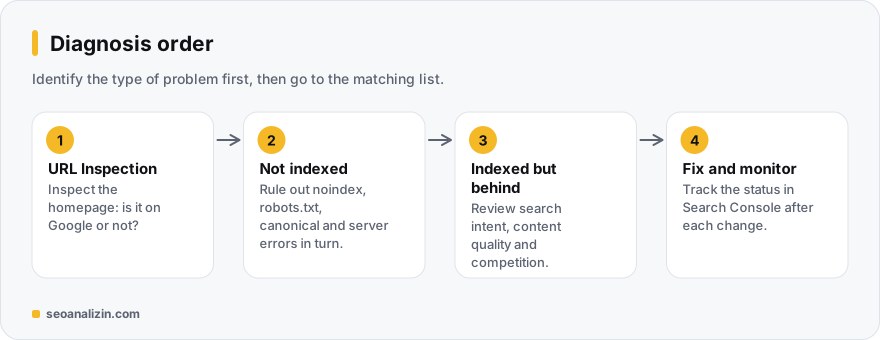
First, tell them apart: indexed or just behind?
In Search Console, run URL Inspection on your homepage. If you see “URL is not on Google,” go through reasons 1-8. If you see “URL is on Google,” go to reasons 9-12. Searching your domain in quotes ("example.com") also gives a quick first impression.
What keeps pages out of the index
- The site is very new. A new domain can take days or weeks to appear. Submit a sitemap and build internal links.
- A noindex is present. Look for
<meta name="robots" content="noindex">in the source orX-Robots-Tag: noindexin the HTTP headers. In WordPress, the “Discourage search engines from indexing this site” box under Settings > Reading is a frequent culprit. - robots.txt blocks crawling. A
Disallow: /line shuts the whole site. Test your address in the Robots.txt Tester. - Canonical points elsewhere. If every page canonicalizes to the homepage, Google only looks at that one.
- The page is rendered only by JavaScript. If the content is missing from the initial HTML, it may be seen late or incompletely. The JavaScript SEO Audit shows the difference.
- The server returns errors. 5xx responses or frequent timeouts make Google reduce crawling.
- Nothing links to the page. An orphan page with no links from a menu, category or other post is found late.
- A manual action or security issue. If Security & Manual Actions in Search Console is empty, rule this out.
Indexed but stuck behind
- The keyword is very competitive. Short queries like “seo analysis” have long-established sites. Start with longer, more specific queries.
- Content does not match search intent. If results show guides and you offer a product page, you will not break into the top. See search intent.
- Content is thin or identical to others. Short, templated or undifferentiated text stays behind.
- Authority and trust are missing. New sites build external links, brand searches and author information over time. See E-E-A-T.
In what order should you check?
Start with items 2, 3 and 4 in ten minutes: they come from a wrong setting and a fix shows quickly. Then check the index status. If the cause is simply that the site is new, the answer is to follow the 30-day plan patiently. For a technical sweep, the SEO Analysis report and the Site Crawler collect these signals in one pass.
Example scenario: a three-week-old site
On a three-week-old site the home page is in the index but blog posts do not show. This is often not a bug but a matter of timing: Google crawls new sites cautiously. Still, there are things you can do during this time:
- Link posts from the home page and to each other; leave no orphan pages.
- Submit the sitemap and check in Search Console whether pages are “discovered” or “crawled.”
- Prepare original, in-depth content for each post; pages that look templated are held back.
If after three weeks they are still “discovered,” go to this guide; if “crawled, currently not indexed,” to that one.
A realistic calendar: the first 30 days
Knowing what to expect in a new site's first months saves you from needless panic. The plan below is not a rule, just a sensible order of work:
- Week 1: verify Search Console, submit the sitemap, and run URL Inspection for the home page and a few key pages. Check for blocks with Indexability Checker.
- Week 2: link every new page from at least two existing pages; leave no orphan pages. Make titles and descriptions original.
- Week 3: in the Pages report, note which pages are indexed, which are not, and why.
- Week 4: look at the first impressions in the Performance report; see which queries you appear for, even in small numbers.
Is your query highly competitive?
It is hard for a new site to reach page one for broad, competitive searches such as “seo analysis” or “cheap flights”; that does not mean your site is faulty. It makes sense to start with more specific, less competitive searches: “how to write alt text,” “sitemap couldn't fetch error.” The long-tail guide and the search intent guide point the way.
Why results look different for you
- Location and language: results vary by city and country; someone in another city sees a different order.
- Personalisation: your search history and sign-in state can affect results; a private window does not remove that difference entirely.
- Device: mobile and desktop results can differ.
So instead of saying “I can't see it,” look at the Search Console Performance report: your impression count and average position give the picture real users see, not just you. To track position regularly you can use Google Rank Checker.
How to read the Performance report
- Impressions but no clicks: your page shows but the title and description do not earn clicks, or the position is far back. Improve them (title length, meta description).
- No impressions at all: the page is not indexed or matches no search. Verify the index status first.
- Average position 50 or higher: the page appears but far back; content depth and internal links come first.
Avoid methods that promise to speed things up
Bought links, hundreds of forum comments or automatic “indexing” tools do not speed up a new site; in most cases they carry risk. The reliable path is clear: original content that really helps users, a clean technical structure, and every page you publish connected to the rest of the site.
Checklist: what I look at first when I do not show up
- Does URL Inspection show the address as “on Google”?
- Does the page have
noindexor a robots.txt block? - Does the page receive a link from another page and appear in the sitemap?
- Does the content answer my query more clearly and usefully than competitors?
- Does the Performance report show at least one impression for this page?
Things you might be wondering
Could my site have a penalty?
It is possible but rare. A manual action is reported explicitly in Search Console. In most cases the cause is not a penalty but being new or having weak content.
I don't even show up for my brand name. Why?
Either the homepage is not indexed or your name is confused with other sites. Run URL Inspection on the homepage first.
Does clicking “Request indexing” again and again help?
No. There is a daily quota, and if the problem is content or a technical block, a request alone will not solve it.



Join the discussion
Share your experience or ask a question about this guide.