



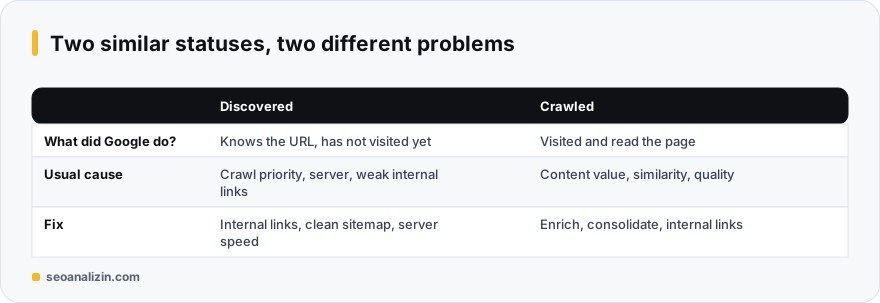
“Discovered – currently not indexed” means Google knows the address but has not visited it yet. The difference from crawled-not-indexed is this: there Google saw the content and passed on it, here it has not seen the content at all.
Why does Google postpone crawling?
Google assigns each site a crawl capacity, shaped by response time and server health. It may queue crawling to avoid overloading your site or to avoid spending resources on addresses it does not find valuable. On small sites the causes are usually:
- The site is new and has not built trust yet.
- Very few internal links point to the page, so it looks unimportant.
- The server is slow or throws errors from time to time.
- Filters, sorting and parameter combinations generate many unnecessary URLs.
How to fix it
- Check Crawl Stats. In Search Console, Settings > Crawl stats shows response time and error rate. If response time is consistently high, fix the server first.
- Add internal links to important pages. Link from the homepage and strong posts in context. See internal linking.
- Clean the sitemap. List only canonical addresses you want indexed that return 200. Remove redirected and noindex pages.
- Reduce unnecessary URLs. Consolidate parameter URLs with canonical and close archive and tag pages that serve no purpose.
- Be patient and monitor. On new sites this can last weeks. If the list is shrinking, you are on the right track.
What not to do
Clicking “Request indexing” one URL at a time can move a page up briefly but does not fix the root cause, and it has a daily quota. Mass-producing content in a hurry makes it worse: as the number of new pages grows, the discovered-but-not-crawled list grows with it.
To make sure no technical blocker exists, use the Indexability Checker and the Sitemap Checker. If the same issue continues after crawling, move on to the crawled-not-indexed guide.
Which pages are worth waiting for?
Not every page in “discovered” status is a problem. On large sites Google prioritises its crawl resources. To decide, weigh the page with three questions:
- Is this page really one that should show in search (and not a filter or archive)?
- Where is it linked from? If it is more than 4 clicks from the home page, bring it closer.
- Does its content clearly differ from similar pages?
If you answer “yes” to all three, strengthen the page and wait patiently; if “no,” merging or noindexing is the more honest fix.
Questions about discovered pages
What is the difference between Discovered and Crawled?
A discovered page has not been visited. A crawled page has been visited and its content read. The first is usually a crawl-priority issue, the second a content-value issue.
How long does this last?
A few weeks on small, new sites. If it stays for months, review internal links and server performance.
Does crawl budget matter for small sites?
It is decisive for very large sites. On small ones the main factors are usually the page looking unimportant and server speed, not budget.



Join the discussion
Share your experience or ask a question about this guide.