



Internal links are the links that connect pages on your site. They tell Google which pages are important and how they relate to each other, and show the user the next step. If a newly published page has no internal links, Google may discover it late or see it as unimportant.
Core principles
- Link more to important pages: link to the home page, main categories and key guides from different places on the site.
- Link within context: a natural link in the body of an article builds a stronger relationship than one in a menu or footer.
- Use meaningful anchors: text that describes the target page's topic. See anchor text.
- Reduce click depth: an important page should be reachable in at most 3–4 clicks from the home page.
- Working links: fix broken and redirected internal links. See the broken link guide.
The hub-and-spoke structure
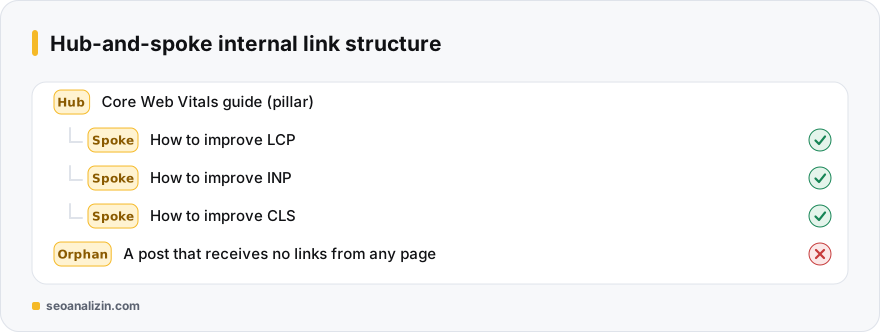
Build a hub page (pillar) that covers a topic comprehensively and spoke pages that handle its subtopics. Spokes link to the hub and the hub to spokes. This structure shows Google your depth on the topic and guides the visitor to related content.
Finding orphan pages
A page that receives no internal link is an “orphan.” Even if it is in the sitemap it carries a weak signal.
- Crawl the site from the home page with the Site Crawler; compare pages that cannot be reached by links against the sitemap.
- In Search Console's Pages report, look at those “discovered, not indexed”: this guide.
- Add links from 2–3 related posts to every orphan page you find.
When you publish a new post
- Link from the new post to 3–5 related older posts.
- Add a link to the new post from 2–3 older posts.
- If a hub page covers the topic, link to the hub.
What to avoid
- Stuffing links into every sentence: it hurts readability.
- Putting nofollow on all internal links. See dofollow and nofollow.
- Linking to the same target dozens of times from one page.
- Relying only on the menu.
Example: linking a 20-post blog
A blog has 20 posts but most are not linked to each other. A quick plan: sort the posts into three topics, choose one hub post for each topic and link the other posts to the hub and to each other. Link to the three hub posts from the home page or menu.
With this setup every post receives at least two links and Google can easily tell the topic clusters apart. The result is kept by repeating the same flow on every new post.
Internal linking questions
How many internal links should a page have?
There is no fixed number. As many as genuinely help the reader; do not overdo it.
Do internal links directly affect rankings?
Indirectly, by showing the importance and relationships of pages.
Is it necessary to add links to old posts?
Yes. It helps discovery of new posts and keeps the topic coherent.



Join the discussion
Share your experience or ask a question about this guide.