



There are four ways to find out whether a page is in Google's index, and they are not equally reliable. The URL Inspection tool in Search Console gives the most trustworthy answer. The other methods are useful for quick screening and for an overview.
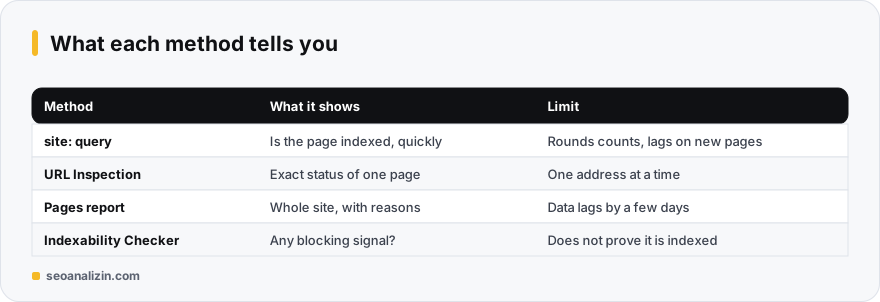
The site: query: fast but approximate
Type your domain after site: in the Google search box. The results show a sample of the pages Google has indexed.
site:example.com
site:example.com/blog/new-post/
If the page appears, it is indexed. If it does not, you cannot conclude much: Google rounds result counts, may leave some pages out of this query, and a newly published page can lag by a few days.
URL Inspection: the definitive answer for one page
- Select your property in Search Console and paste the full page address into the search bar at the top.
- If the result says URL is on Google, the page is indexed. If it says URL is not on Google, the reason appears on the same screen.
- Read the Crawl and Indexing sections for the canonical Google selected, the last crawl date, and the robots.txt and noindex status.
- If you just fixed the page, use Test live URL to see its current state.
The Pages report: the whole site in one table
In the left menu, Indexing > Pages lists how many pages are indexed and not indexed, with the reasons. Filter by your submitted sitemap to catch pages that were submitted but not indexed directly. Data in this report usually lags by a few days.
Indexability Checker: is anything blocking the page?
The Indexability Checker looks at signals that can keep a page out of the index: noindex, X-Robots-Tag, robots.txt and canonical. A clean result does not prove the page is indexed, only that nothing is in its way. It is a useful first screen before you open Search Console.
You have a result. Now what?
- Page is new and not indexed: add it to your sitemap, link to it internally and wait a week.
- Crawled but not indexed: this can be a content quality issue, see this guide.
- Discovered but not crawled: follow the steps in this guide.
- Noindex or a robots block: read how to add and remove noindex.
- Indexed but invisible for every query: try the why is my site not showing checklist.
Example: a quick diagnosis with three checks
Say the home page of example.com is in the index but /blog/new-post/ does not show up in search. Check three things in order: (1) Does the URL Inspection tool in Search Console say the address is “not on Google”? (2) Is there a noindex or a wrong canonical in the page source? (3) Does robots.txt block this path?
If the first answer is “not on Google” and the second and third are clean, the problem is usually on the content or discovery side: add an internal link to the page, include it in the sitemap and send an indexing request. If one of the three is a problem, fix it first and send the request afterwards.
The most common reasons a page is not in the index
- The site is very new: it can take days to weeks for Google to discover and crawl a site. No tool ties this to a guaranteed time.
- There is a block: the page may carry
noindex, robots.txt may haveDisallow, or the page may be password protected. - It cannot be discovered: a URL that no page links to and that is not in the sitemap may never be found.
- Value is not seen: thin, duplicate or templated pages may be crawled but not indexed.
- Technical trouble: server errors, constant redirects, very slow responses.
Adding your site to Search Console the right way
To verify the whole site instead of a single address, choose a “Domain” property and verify it with a DNS record; then http, https, www and subdomains all appear in one place. If you have no DNS access, a “URL prefix” property verified with an HTML file or a meta tag also works, but it shows data for that address only.
The indexing request: what it does and does not do
- Paste the full address into the search box at the top of Search Console.
- If the result says “URL is not on Google” and you found no block, press Request indexing.
- Do not send repeated requests for the same address; there is a daily quota, and repeating does not shorten the wait.
The request tells Google about the URL, but it does not guarantee indexing. If the page is genuinely valuable and unblocked, it is usually processed within days; if it is not, the real cause is most often the content.
Being indexed does not mean showing up in rankings
A page can be in the index and still rank high for nothing. Indexing is only the entry condition; ranking is the result of content, competition and the site's credibility. If the answer to “is it indexed” is yes and no traffic arrives, the second step is the why is my site not showing on Google guide.
When the site: query misleads
site:example.com gives an approximate number and is not reliable for whether a specific page is indexed. The count can look higher or lower than reality; not seeing a URL in the query does not prove it is missing from the index. For a definite answer, rely only on URL Inspection.
A small table for weekly tracking
- The “Indexed” total in the Pages report: note it every Monday at the same time.
- For each newly published page, the publish date and the date it was first seen as indexed.
- The number of non-indexed pages and the main reason Search Console gives.
After three weeks these notes show your site's real discovery speed; you speak from your own data rather than from estimates.
Quick questions
Does being indexed mean I will rank?
No. Being indexed is the first requirement for ranking. Which queries you appear for, and where, is a separate question.
site: shows nothing but Search Console says the URL is on Google. Which one is right?
Search Console. The site: operator is an approximate view, while URL Inspection reports Google's own records.
How long does indexing take?
From days to weeks. Strong internal links and a sitemap can shorten it, but no timeframe is guaranteed.
What if I do not have Search Console access?
You can verify ownership with a DNS record or an HTML tag. Until then, use site: and tools for a first screening.



Join the discussion
Share your experience or ask a question about this guide.