



Noindex is a directive asking that a page not appear in search results. It is the right tool for content that has no use in search, such as thank-you pages, internal search results, login and cart pages. Its biggest danger is being added by accident to an important page or to the whole site.
How to add noindex
Meta tag (for HTML pages):
<meta name="robots" content="noindex">To address only Googlebot, use name="googlebot". The HTTP header is for non-HTML files; see the X-Robots-Tag guide.
In WordPress
- Single page: in Yoast, Rank Math or a similar SEO plugin, turn off “Show in search results” in the page's advanced settings.
- Whole site: the Settings > Reading > Discourage search engines from indexing this site box adds noindex. It is useful on a staging site; do not forget to turn it off before launch.
- Archives: you can set tag, author and date archives to noindex in the plugin settings.
The critical rule: do not block with robots.txt
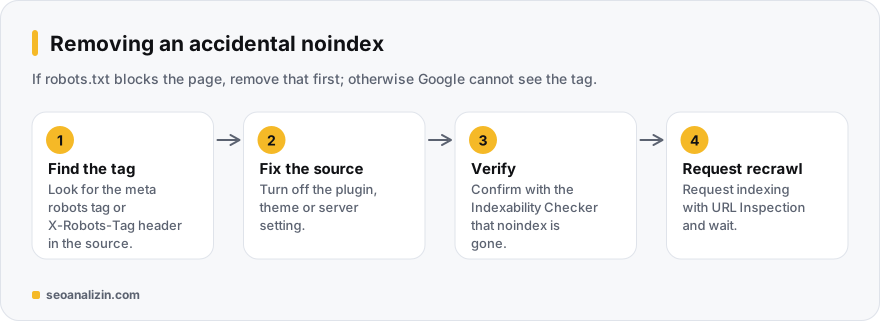
Googlebot must be able to crawl the page to read noindex. If the page is blocked by robots.txt, it cannot see the tag and the address may stay in the index. Add noindex first, and block the page only after it has left the index if you wish. Details: robots.txt vs noindex.
How to remove noindex
- Find the meta tag or header containing
noindexin the page source. Check plugins, theme and server settings. - Remove the tag and publish the change.
- Confirm with the Indexability Checker that the page now looks indexable.
- Use “Request indexing” in the Search Console URL Inspection tool.
- Wait a few days or weeks; Google's recrawl takes time.
Getting caught by an accidental noindex
- A noindex from the staging environment may remain on the live site.
- A plugin update or theme change may have reset the setting.
- URLs in the sitemap that are noindex appear in Search Console as “Excluded by ‘noindex’ tag.”
To find out whether a page is indexed, see the index check guide.
Which pages get noindex?
Noindex is a tool, not a strategy. The general rule: apply it to pages that are needed by users but have no value in search.
- Yes: thank-you pages, internal search results, cart and account pages, print versions.
- Yes (depending): thin tag and date archives.
- No: any page you want to appear in search; do not noindex a page just because it is new or weak.
Improving a weak page rather than hiding it is often the right path.
Noindex questions
Are noindex and nofollow the same?
No. Noindex removes the page from results; nofollow says not to trust the links on the page. They can be used together.
How long does noindex take to work?
Until Google recrawls the page; between days and weeks.
Should I noindex thin blog posts?
First consider improving the post. Noindex is an option for pages that have no value and need not appear in search.



Join the discussion
Share your experience or ask a question about this guide.