



Seeing this status in Search Console means Google visited your page, read it and decided not to index it. It is not an error but an evaluation: the page is technically reachable, yet Google does not think it adds enough value to be indexed, or has not decided yet.
Why does it happen?
- The content is thin or templated. Dozens of near-identical pages, or text that repeats the same idea.
- Another page already covers the topic. Google picks one of two similar pages and leaves the other out.
- The page is new. Google can take time to decide after the first crawl.
- The site's overall quality perception is low. Many weak pages can slow down indexing of the good ones too.
- A soft 404. The page returns 200 but is empty or says “not found.” See the soft 404 guide.
Step-by-step fix
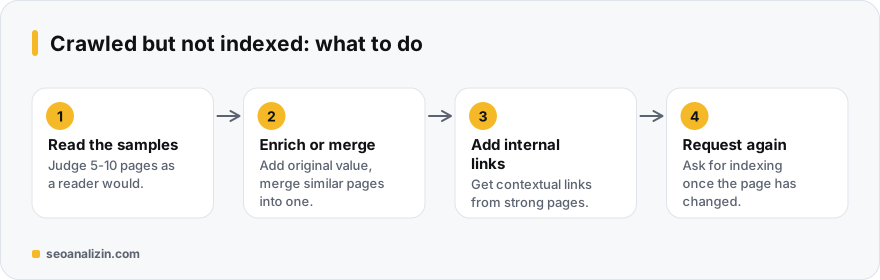
- Read the samples. Open this status in the Pages report and read 5-10 URLs like a real reader. Do they say something another page answers better?
- Enrich the content. Add an original example, data, a screenshot or a detail only you know. Raising the word count alone does not work.
- Consolidate similar pages. Instead of three weak pages on one topic, write one strong page and 301 the old ones to it. See duplicate content.
- Add internal links. A contextual link from your strong pages signals the page's importance. See the internal linking guide.
- Remove pages that add no value. Use 404/410 or noindex for empty tag pages, filter combinations and old campaign pages.
- Request indexing after the fix. Use Request indexing in URL Inspection. Asking repeatedly without changing the page does not help.
When is waiting reasonable?
If the page is a week or two old and genuinely original, wait first and strengthen its internal links. If the number of pages in this state keeps growing over weeks, it is not a timing issue but a quality signal, and the list above applies.
To confirm the page is technically clean, use the Indexability Checker. If there is no noindex, robots block or canonical error, the cause is most likely the content.
Example: 40 similar city pages
A service site has 40 pages where only the city name changes, and all are “crawled, currently not indexed.” Google saw the pages but could not tell them apart. The fix is not to add more pages but to add value: write information specific to each city (price, duration, references, FAQs) or merge the pages you cannot add value to.
After the fixes, support the pages with internal links and send an indexing request. Results can take weeks to show; do not expect them the same day.
Questions about crawled pages
Is this a penalty?
No. It is a status record of a decision not to index, not a penalty notice. A penalty would be listed under Manual Actions.
How many pages in this state is a problem?
There is no fixed threshold. Pay attention if your important pages are on the list or the ratio is growing. A few old or low-value URLs are normal.
Does adding the page to the sitemap help?
It makes discovery easier but does not change the decision to index. That decision depends on the content's value.



Join the discussion
Share your experience or ask a question about this guide.