



A meta description is a suggestion for the description text of your page in search results. It is not a direct ranking factor, but a good description can affect click-through rate. Google often shows a passage of its own choosing from your page based on the query, yet a well-written description improves your chance of being chosen.
Length
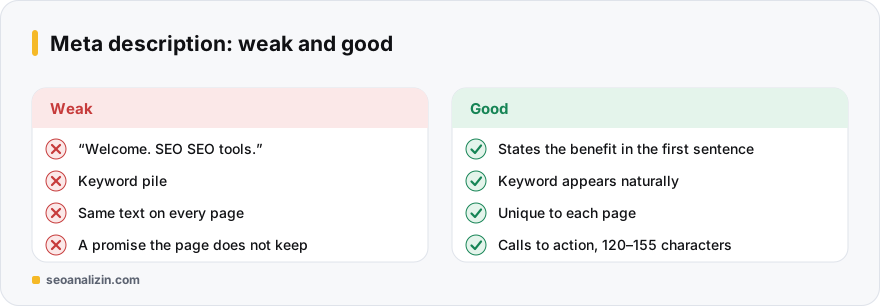
There is no official limit. About 150–160 characters show on desktop and slightly fewer on mobile; the rest is trimmed. In practice 120–155 characters, with the main promise in the first sentence, is safe. Measure with the Word and Character Counter.
Components of a good description
- State the answer or benefit: say clearly what the page gives the reader.
- Use the keyword naturally: words from the user's search may appear in bold, which adds visibility.
- Call to action: verbs such as “learn,” “compare” and “calculate” work.
- Write one per page: do not repeat the same description across hundreds of pages.
- Do not mislead: a promise the page does not keep leads to a high bounce rate.
Before and after
Weak: “Home page. Welcome. SEO SEO tools SEO analysis for your site.”
Good: “Find your site's technical, on-page and performance issues for free in 10 minutes. No sign-up needed, the report is ready instantly.”
<meta name="description" content="Find your site's technical, on-page and performance issues for free in 10 minutes. No sign-up needed, the report is ready instantly.">Why does Google change your description?
Descriptions that do not match the search query, or are too short, too generic or duplicated, are often replaced. That is not a bug. A description prepared separately for each page that accurately summarises its content reduces this.
Checking descriptions
- Try the look in results with the SERP Preview.
- See missing or overlong descriptions with the Meta Tag Analysis.
- List repeated descriptions across the whole site with the Site Crawler.
For titles, also see the title length guide.
A pattern for 15 examples
Most good descriptions come from this skeleton: [what the page offers] + [who or when it helps] + [a call to action]. Three examples:
- Blog post: “Steps to improve Core Web Vitals: practical fixes with examples for LCP, INP and CLS. Try them now.”
- Tool page: “Test your site's robots.txt file for free and see blocked pages in seconds.”
- Product category: “Men's sports shoe models, current prices and same-day shipping. Choose size and colour and browse now.”
Do not copy this pattern; adapt it to the real value each page offers.
Three steps for writing a description
- Write the searcher's question in one sentence: “How do you write alt text?”
- Give the page's answer in one sentence: “Alt text is a short sentence that describes an image; learn the rules with good and bad examples.”
- Add a small call to action: “Audit your site with the checklist now.”
Combined, these three parts give a description of roughly 140–160 characters. Google does not use the description as a ranking signal, but it may show it as the snippet, and a good snippet raises clicks.
Patterns by page type
- Blog post: problem + answer + benefit. “When does a 404 hurt SEO? Learn with examples which pages to redirect and which to leave as 404.”
- Product page: product + distinguishing feature + trust detail. “Nike Pegasus 41 men's running shoe: light sole, 2-year warranty, same-day dispatch.”
- Category page: what there is, how many kinds, how to choose. “Running shoes: over 120 models; filter by size, sole and price.”
- Tool page: what it does + how long it takes + whether it is free. “Check your site's technical SEO in 60 seconds; free report, no sign-up needed.”
Note: write the figures in the examples (warranty length, model count) only if they are true; an exaggerated promise hurts both the user and Google's trust.
What it looks like in HTML
<head>
  <title>How to Write Image Alt Text: A Guide With Examples</title>
  <meta name="description" content="Alt text is a short sentence that describes an image. Learn the rules with good and bad examples and audit your site with the checklist.">
</head>
Five things to avoid
- Using the same description on many pages.
- Repeating the title word for word; the description should say what the title does not.
- Writing a keyword list: “seo, seo analysis, seo tool, free seo”.
- Promising something the page does not have.
- Double quotes in the text: a quote (
") can break the description in HTML; avoid them unless needed.
When Google rewrites your description
Google may pick another sentence from the page that matches the search phrase and show that instead. It is not an error. The value of writing your description is that the page enters most searches with a good summary and that, for some searches, Google uses it as it is. If it is rewritten all the time, your description may not match the page, or the content may not answer the searched question clearly.
Bulk audit
- Export every page's description with Site Crawler.
- Separate the empty and repeated ones.
- Write the 20 pages with the most visits first; automate the rest with a template.
- Check length and appearance with Meta Tag Analyzer and SERP Preview.
Short answers on meta descriptions
Does the meta description affect rankings?
Not directly. It indirectly affects clicks and expectation.
What if I do not write one?
Google picks a passage from the page. On important pages, writing your own is more controlled.
Should I add a list of keywords?
No. A pile of keywords adds nothing; write a natural sentence.



Join the discussion
Share your experience or ask a question about this guide.