



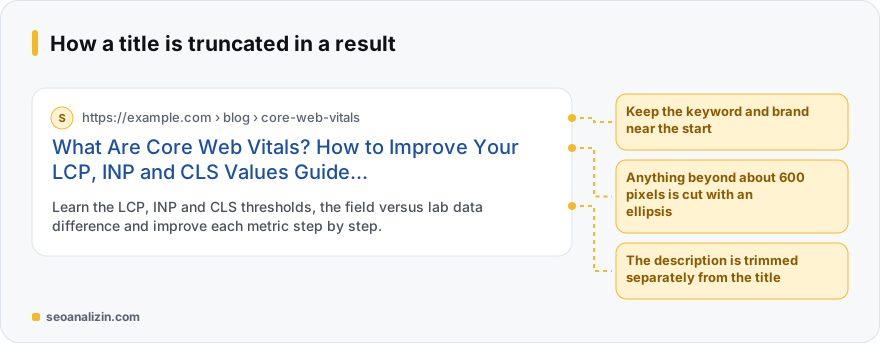
There is no fixed character limit for title length. Google truncates by pixel width, which on desktop is usually around 600 pixels. In practice that works out to roughly 50 to 60 characters, but wide letters (M, W) take more space and narrow ones (i, l) take less. “50–60 characters” is a guideline, not a hard rule.
Why pixels matter more than characters
“Maximum Mastery” and “Illi Illi Illi” can have the same character count but very different widths. If a title does not fit, Google cuts the end with an ellipsis; if the important word was left at the end, it disappears from the result. So placing the keyword and brand in the right order matters more than length.
Practical rules
- Put the main topic first and the brand last: Topic | Brand.
- Write a unique title for every page; repeated titles make pages look alike.
- Use the keyword naturally, once. Repeating it helps nothing.
- Users should understand what they will find: the title is a promise and the page the fulfilment.
- Markers like the year or a number can raise clicks, but the page must really be current.
Google may change your title
Google does not always show the <title> tag as written. If the title is too long, stuffed with keywords or does not describe the page well, it may use the H1 or other text on the page. That is not a bug, but if your title is not chosen, it hints that the title is weak.
Preview and check
- Try how the title will look on desktop and mobile with the SERP Preview.
- Measure length with the Word and Character Counter.
- Evaluate title and description together with the Meta Tag Analysis.
- The SEO Analysis report flags pages where the title is missing, too short or too long.
<title>What Are Core Web Vitals? LCP, INP, CLS Guide | SEOANALİZİN</title>For the description to write alongside it, see the meta description guide; for the general logic of titles, the title tag post.
Before and after: three title examples
- Weak: “Home | Company.” The topic is not clear.
- Too long: “Cheap Shoe Models Men Women Kids Sports Shoe Prices Discounted Shoes | Brand.” The end is cut off, a pile of keywords.
- Good: “Sports Shoe Models and Prices | Brand.” Topic first, brand last, fits the screen.
After changing a title, watch the page's click-through rate in Search Console for a few weeks; Google must recrawl the page for the result to show.
Five structures that work in a title
A good title tells the searcher “the answer you want is here.” The patterns below work on different page types; in all of them the main keyword sits near the start:
- How-to: How to Write Image Alt Text: A Guide With Examples
- Definition and fix: What Is a 404 Error? SEO Impact and How to Fix It
- List: Sitemap Errors: 7 Common Causes and How to Fix Them
- Comparison: 301 or 302? Which to Use and When
- Product or tool: Free SEO Analysis: Check Your Site in 60 Seconds
Where does the brand name go in a title?
The brand name can lead on the home page; on inner pages put it last and keep it short: … | SEOANALİZİN. If you spend the start of the title on the brand, the keyword the searcher cares about may fall in the truncated part. If the brand name is long and the title is already full, leaving the brand out of inner-page titles is acceptable; Google recognises the site from its domain and other signals.
Real examples: before and after
The titles below were too long, too short or said nothing. The fixed versions state plainly what they promise the searcher:
- Before (93 characters): Free SEO Analysis Tool | Website SEO Checker and Report | Best SEO Audit Online | SEOANALİZİN
After (48 characters): Free SEO Analysis: Check Your Site in 60 Seconds - Before (8 characters): Alt Text
After (50 characters): How to Write Image Alt Text: A Guide With Examples - Before (4 characters): Home
After (54 characters): SEOANALİZİN: Free SEO Analysis and Rank Tracking Tools
Note that shortening does not mean throwing away information; it means moving the main promise forward. A title like “Home” is short in characters but does no work because it carries no information.
Do not reuse one title on many pages
When pages are published with the same title, Google struggles to tell which fits which search, and users cannot tell the pages apart in the results list. In templated titles (Product | Category | Brand) at least the product name must differ on every page. To detect duplicate titles in bulk, see the title list in the Site Crawler report.
Title, H1 and the social sharing title
- Title (title tag): the heading shown in search and on the browser tab.
- H1: the main heading inside the page; it may match the title but does not have to (see the H1 guide).
- og:title: the title shown when the page is shared on social media; it can be set separately (see the Open Graph guide).
A checklist before publishing
- Is the main keyword within the first three or four words?
- Does the title read without being cut off, at roughly 50–60 characters? Check it in SERP Preview.
- Is the same title used on another page of the site?
- Does the title promise what the page actually contains? Avoid exaggeration and clickbait.
- Are details such as numbers, the year or brackets really needed?
Title length questions
If my title is truncated, will rankings drop?
No. Truncation only affects appearance in the result; Google evaluates the whole title.
Is a very short title a problem?
A very short title wastes the opportunity. Write a natural phrase that describes the page fully.
Is the limit different on mobile?
On mobile the title can often show more characters, but use desktop as your reference.



Join the discussion
Share your experience or ask a question about this guide.