



When you share a link on WhatsApp, LinkedIn, Facebook or X, the card that appears (title, description and image) comes from the Open Graph (og:) and Twitter Card tags on your page. It is not a ranking factor, but it determines the clicks from sharing: a card without an image or a broken card is often ignored.
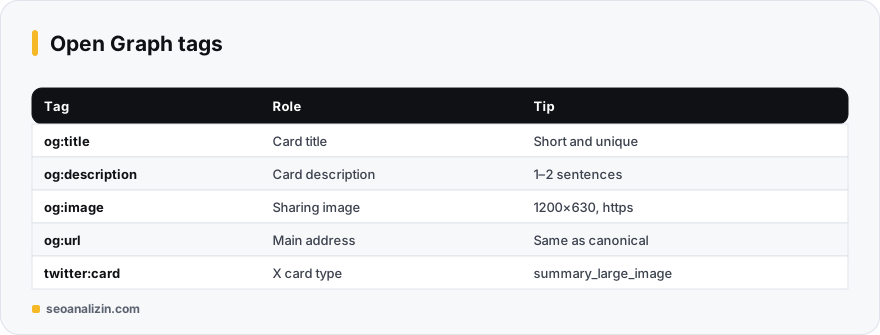
Required tags
og:title: the card title; it can differ from the page title.og:description: a short description, usually 1–2 sentences.og:image: the sharing image, which must be an absolute (https) address.og:url: the page's main address, the same as the canonical.og:type:websitefor the home page,articlefor posts.twitter:card:summary_large_imagefor a large-image card.
<meta property="og:title" content="What Are Core Web Vitals?">
<meta property="og:description" content="How to improve your LCP, INP and CLS values.">
<meta property="og:image" content="https://example.com/img/cwv-1200x630.jpg">
<meta property="og:url" content="https://example.com/blog/core-web-vitals/">
<meta property="og:type" content="article">
<meta name="twitter:card" content="summary_large_image">
Image size
- The recommended ratio is 1.91:1; the common size is 1200 × 630 pixels.
- Keep the file light (usually under 1 MB) and use JPG or PNG.
- Keep important content in the centre; edges may be cropped by platform.
- Do not make text in the image small; it must be readable on mobile.
Testing the preview and the cache
- Confirm the tags are read and see how the card looks with the Open Graph Preview.
- Refresh the cache with Facebook's Sharing Debugger and LinkedIn's Post Inspector: platforms store the old card.
- Remember that after changing tags, old shares may not update.
Sharing card mistakes
- The image address is relative (
/img/a.jpg) or http. - The same title and image on every page.
- The image is blocked by robots.txt or needs a login.
- og:url differing from the canonical.
For general meta tags see the meta description post, and for titles the title length guide.
A flow for testing a sharing card
- Open the page's
og:imageaddress on its own in a browser: the image must show and be https. - Confirm with the Open Graph Preview that the title, description and image are read.
- Paste the link into the Facebook Sharing Debugger and LinkedIn Post Inspector to refresh the cache.
- Send it to yourself in a real app (such as WhatsApp) and check the card by eye.
Cards may be cropped a little differently by platform and device; do not put critical text at the edge of the image.
Sharing card questions
Does Open Graph affect SEO?
Not directly. It brings more clicks from sharing and, indirectly, more visibility.
Is the Twitter Card tag required?
Without it, X falls back to Open Graph tags. You can still add twitter:card for a large image.
Why is my image not updating?
Platform cache. Re-scrape the link with the debugger tools.



Join the discussion
Share your experience or ask a question about this guide.