



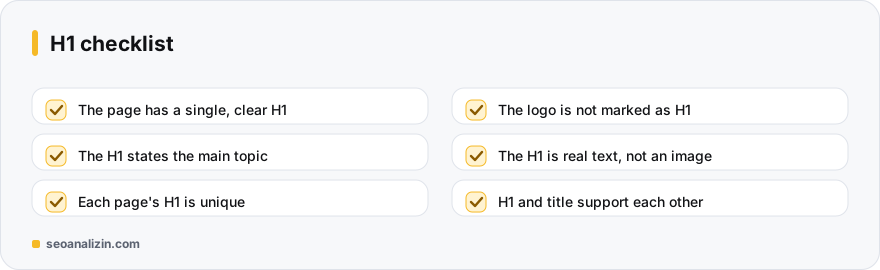
The H1 is the top-level heading on a page and answers the visitor's question “what is this page about?” HTML rules allow more than one H1, and Google does not treat that as a penalty; still, in practice a single, clear H1 is the easiest structure for users and screen readers.
Are H1 and title the same thing?
No. The title (<title>) appears in the browser tab and in search results; the H1 appears inside the page. They can be the same or different: the title is written to earn a click in search results, the H1 to welcome the reader on the page. They just must not contradict each other.
A good H1
- States the page's main topic clearly.
- Is unique on every page; the same H1 should not appear on all pages.
- Contains the keyword naturally but is not a keyword list.
- Is short and readable; usually fits on one line.
Common H1 mistakes
- No H1: the theme title may be written with another tag instead of H1.
- The logo marked as H1: the same H1 appears on every page. The logo should be a link, not an H1 (the home page may be a judgement call).
- The page title is not an H1: the post title is written as an H2 or a
<div>. - All template headings are H1: menu, banner and sidebar headings as H1 break the structure.
- H1 inside an image: if the text is only an image, search engines cannot read it.
<h1>What Are Core Web Vitals? A Guide to LCP, INP and CLS</h1>Checking your H1s
- The Heading Analysis shows the H1s and hierarchy on a page.
- The SEO Analysis report flags a missing or extra H1.
- Use the Site Crawler to find missing or repeated H1s across the whole site.
For the whole heading structure, see the heading hierarchy guide; for writing titles, the title length post.
Theme and H1: a WordPress example
Most WordPress themes make the post title the H1, but some themes make the logo or site name an H1 on every page. To check, search the page source for <h1: one or two results are expected on a post page. If the same text is the H1 on every page, it should be fixed from the theme settings or a child theme.
After fixing, check a post, a page and a category page separately; different templates behaving differently is common.
How many H1s should a page have?
HTML allows more than one H1 on a page and Google does not treat it as an error. Still, the best practice is to use one main heading that states the page's topic clearly; it gives a clearer structure to screen reader users and to search engines alike. If you see several H1s on a page, the cause is often the theme or a plugin; decide according to the page design.
What happens when the logo is the H1?
Some themes put the logo inside an H1 on every page. Then the page's real title cannot be the H1, and every page's main heading is the same brand name. The right way is to make the logo an H1 only on the home page (if you like) and show it as a non-heading element on inner pages:
<!-- Wrong: the same H1 on every page -->
<header><h1><a href="/">SEOANALİZİN</a></h1></header>
<main><h2>How to Write Image Alt Text</h2> ... </main>

<!-- Right: on an inner page the H1 is the page's topic -->
<header><a href="/" class="logo">SEOANALİZİN</a></header>
<main><h1>How to Write Image Alt Text</h1> ... </main>
H1 examples by page type
- Blog post: can be more descriptive than the title tag: How to Write Image Alt Text (With Examples).
- Product page: the full product name: Nike Pegasus 41 Men's Running Shoe.
- Category page: in the words the searcher uses for the category: Men's Running Shoes.
- Service page: service + place: Web Design Services in London.
- Tool page: the job the tool does: Free Sitemap Checker.
- Home page: the site's main promise: Free SEO Analysis and Rank Tracking.
How should the H1 and title fit together?
Both should serve the same page and the same intent; they need not be word for word the same. The title is short and appealing in search, while the H1 is the descriptive line that greets the visitor on the page. For example, the title could be 404 Errors: SEO Impact and Fixes and the H1 What Is a 404 Error and How Do You Fix It?.
An H1 created with JavaScript
If the H1 is added with JavaScript after the page runs in the browser, Google usually sees it; still, having the heading in the HTML that comes from the server is safer and faster. To check, search the page source (View source) for <h1; if you cannot find it, the heading is added later and is worth a look with JavaScript SEO Analyzer.
Before and after
- Before: no H1; the page title is set large in a
<div>. After: the same text is wrapped in an<h1>, with the look kept by CSS. - Before: the H1 on every page is “Welcome”. After: on every page it is that page's topic.
- Before: a 12-word keyword list inside the H1. After: one natural sentence.
A short audit
- Does the page source contain
<h1and does it state the page's topic? - Is the logo or the menu inside an H1 by accident?
- Do the H2s follow the H1 in a sensible order? See the heading hierarchy guide.
- Crawl all pages with Heading Analyzer and Site Crawler and list those with a missing or duplicate H1.
Short answers on the H1
Do multiple H1s cause a penalty?
No. Google does not count it as a problem, but a single H1 gives a clearer structure.
Should the H1 contain the keyword?
If it describes the page topic it will naturally. Do not force it.
Can I write the H1 differently from the title?
Yes, as long as they support each other.



Join the discussion
Share your experience or ask a question about this guide.