



Heading tags (H1–H6) work like a page's table of contents. Readers and screen readers look at them to scan content, and Google to understand the structure of the topic. A heading hierarchy is not a direct ranking factor, but a clear structure improves both user experience and how well the content is understood.
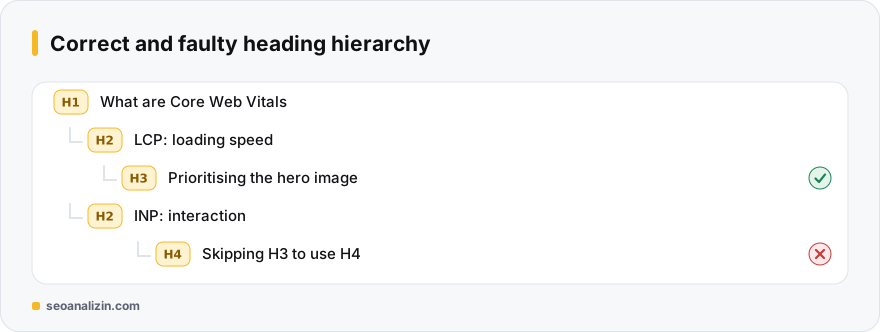
The logic: think of a book
- H1 is the book's title: the main topic of the page.
- H2 headings are chapter titles.
- H3 headings are subheadings of a chapter; H4–H6 go deeper when needed.
Golden rules
- H1 first, then H2, then H3: do not skip levels (do not jump from H2 straight to H4).
- Do not use headings for styling. If you want text to look large, use CSS; a heading tag carries meaning.
- Each heading should summarise what is beneath it; avoid meaningless headings such as “Introduction.”
- Do not turn headings into keyword lists; write naturally and descriptively.
- A single H3 under an H2 is often unnecessary.
Sample tree
H1  What Are Core Web Vitals
  H2  LCP: loading speed
    H3  Prioritising the hero image
  H2  INP: interaction
H2 CLS: layout shiftMenu, footer and sidebar
Template headings (for example “Categories,” “Latest posts”) can be regular text or a non-heading element instead of an H2, so the real structure of the page stays clear. Make sure these headings do not disturb the main flow of content.
Checking a hierarchy
- The Heading Analysis outputs all headings on a page as a tree and shows skipped levels.
- The SEO Analysis report flags a missing H1 and multiple H1s.
- For detail on a single H1, see the H1 tag guide.
A similar context rule applies to images; see the alt text guide.
An example of fixing an existing page
A page's headings look like this: H1 “Our Services,” then H3 “Web design,” H3 “SEO,” then H2 “Contact.” The problems: H2 is skipped and the Contact section is not at the same level. The fix: make the H3s H2s; if they have sub-parts, make those H3s. For menu and footer headings, use regular text instead of a heading tag.
After fixing, output the tree again with the Heading Analysis; the structure should read like a table of contents.
Heading hierarchy questions
Does skipping heading levels cause a penalty?
It is not a penalty, but it blurs the structure and weakens accessibility.
Do I have to use H4–H6?
No. Most pages are fine up to H3.
Should I put the keyword in headings?
Yes if it describes the topic naturally. Forced repetition helps nothing.



Join the discussion
Share your experience or ask a question about this guide.