



Alt text (the alt attribute) tells someone who cannot see the image, for example a visitor using a screen reader or a browser that failed to load it, what the image is. It also helps Google understand the image and is a key signal for traffic from Google Images. Accessibility comes first; the SEO benefit is its natural result.
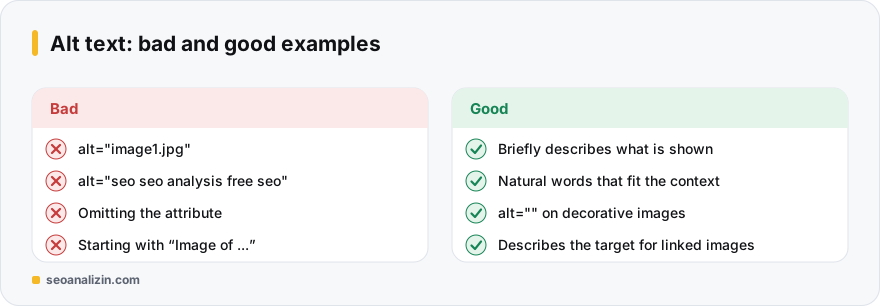
Rules for good alt text
- Describe what is in the image briefly and concretely; one sentence usually suffices.
- Relate it to the context of the page: the same image can get different alt text on a different page.
- Do not start with “image of,” “picture of” or “photo of”; a screen reader already announces an image.
- Include a keyword only if it fits naturally. A pile of keywords counts as spam.
- If the image contains text, put that text in the alt.
Examples
- Bad:
alt="image1.jpg",alt="seo seo analysis free seo tool" - Good:
alt="SEO Analysis report showing the score out of 100 and category scores"
<img src="/img/report.webp" alt="SEO Analysis report showing the score out of 100 and category scores" width="800" height="450">Decorative images
For ornamental lines, spacer images or icons already explained in the text, use an empty alt: alt="". Do not delete the attribute entirely; the empty value tells a screen reader to skip the image. Without the attribute, the file name may be read aloud.
Images that are links
If the image sits inside a link, the alt text should describe where the link goes: “View the price list,” “Home page.”
File name and size
- Use a meaningful file name:
seo-analysis-report.webp, notIMG_4021.jpg. - Give
widthandheight: layout shift decreases. See Core Web Vitals. - Use a modern format (WebP, AVIF) and the right size.
Checking alt text
The Image Alt Checker lists images on a page that lack alt text or have it empty. The SEO Analysis report also includes an image alt check; use the Site Crawler to see which pages need work.
Three images, three alt texts
The right approach for three different images in a blog post:
- Screenshot: “List of reasons for non-indexed pages in the Search Console Pages report” — says what it shows.
- Chart: “Chart of a 12-week rise in clicks over the last 3 months” — states the data and trend; give the detail in nearby text.
- Decorative line:
alt=""— so a screen reader skips it.
When writing alt text, ask yourself: what does someone who cannot see this image need in order to understand the page?
Before writing, ask: what job does this image do?
Good alt text depends on the image's role on the page; the same photo can deserve different alt text on two pages. Before writing, put the image into one of four groups:
- Informative image: a photo, screenshot or product picture. Say what it shows in one short sentence.
- Functional image: an icon or logo that works as a link or button. Describe where it goes, not what it looks like.
- Decorative image: a divider line or background pattern. Use an empty alt (
alt=""). - Complex image: a chart, infographic or diagram. Put a short summary in the alt text and the detail in the text next to it.
Alt text examples by image type
The list below shows the logic on a company blog and an online shop. The common mistake comes first, the better version second:
- Product photo:
alt="shoe"becomesalt="Black leather men's classic shoe, side view". Colour, material and angle are the details a buyer looks for. - Logo link:
alt="logo"becomesalt="SEOANALİZİN home". When the logo is a link, describe the destination. - Screenshot:
alt="screenshot"becomesalt="Search Console Pages report listing reasons pages are not indexed". - Chart:
alt="chart"becomesalt="Line chart showing clicks rising from 120 to 340 over three months". The full data should also appear as text on the page. - Image containing text: carry the words into the alt:
alt="Free SEO analysis: check your site in 60 seconds". Where you can, use real text on the page instead of baking it into the image.
An alt text pattern for e-commerce
You cannot hand-write the alt text of hundreds of products; build a pattern and fill it from product data. What matters is that every product's text is unique and that the pattern reads naturally:
Pattern:  [Brand] [Product type] [Colour/Material], [View]
Example:  Nike Pegasus 41 men's running shoe, navy, side view
Example:  Nike Pegasus 41 men's running shoe, navy, sole detail
Do not reuse the same alt text on all five photos of one product; add the angle or the detail shown. Pasting the product name unchanged into every image tires screen reader users and gains you nothing.
Where to enter alt text in WordPress and other panels
In WordPress, alt text lives in the “Alternative Text” field on the right when you select an image in the Media Library; the same field appears when you select an image block in the editor. The title and description fields do not replace it. Uploaded images do not turn the file name into alt text automatically; the field stays empty. For bulk fixes, first list the missing ones with a crawler, then start with the pages that get the most visits.
Three things to check beside alt text in image SEO
- File name:
seo-analysis-report.webpis more meaningful thanIMG_4021.jpg. If you rename later, remember a redirect for the old address. - Surrounding text: Google understands an image's topic not only from alt but also from the heading, subheading and the paragraph next to it.
- Technical eligibility: the image should be a real
<img>element; CSS background images cannot take alt text and rarely show in image search. Do not putloading="lazy"on the main image at the top of the page; it slows it down.
Six alt text mistakes
- Writing the same keyword on every image (
alt="seo analysis"×40). - Confusing an empty alt with a missing one:
alt=""is right for decorative images, while no attribute at all is wrong. - Starting with “Image of …” or “Photo: …”.
- Stuffing keywords:
alt="cheap shoes best cheap shoes shoe prices". - Writing too much; more than a sentence tires a screen reader user.
- Not describing the destination on a linked image.
A four-step bulk audit for your site
- Crawl all pages with Site Crawler and export the images missing alt text.
- Sort images into three groups: content, functional and decorative.
- Start with pages that get traffic; give decorative images an empty alt and write descriptive text for the rest.
- Re-check page by page with Image Alt Checker and keep a note of what you changed.
Short answers on alt text
How long should alt text be?
Short and descriptive; under about 125 characters is usually enough. For complex graphics, give a longer description in nearby text.
Is alt text a ranking factor?
It helps image search and page understanding; it does not change rankings on its own.
Should every image have alt text?
Content images, yes. For decorative ones give an empty alt (alt="").



Join the discussion
Share your experience or ask a question about this guide.