



Opening the source to find a page's title, headings or canonical is tiring. The SEOANALİZİN Chrome extension does it in one click: as you browse it shows the SEO and AI/GEO readiness per page. Core analyses run in your browser and the extension is free.
When does it help?
- A quick final check before publishing a post on your own site.
- Glancing at a competitor page's heading structure and tags.
- A short review on a client's site during a meeting.
- Browsing many pages in a row and noting gaps.
What do you see?
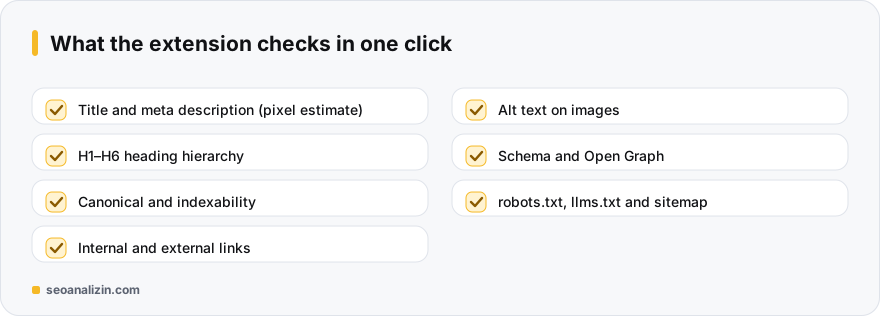
The extension has two modules. The SEO Analysis module looks at the active page:
- Title and meta description: length and pixel estimate. See title length.
- Heading structure: the H1–H6 hierarchy. See heading hierarchy.
- Canonical and indexability: indexing signals.
- Links: internal and external links.
- Images: those missing alt text. See alt text.
- Schema and Open Graph: structured data and sharing tags on the page. See schema markup and Open Graph.
The AI/GEO Analysis module evaluates technical readiness signals such as robots.txt, llms.txt, the sitemap, structured data and access for AI bots. See the GEO guide.
Using it
- Add the extension from the Chrome Web Store via the link on the Chrome extension page.
- On the page you want to examine, click the icon in the toolbar.
- Review the results; note items that are missing or show a warning.
- For a detailed, scored report, run the same address in the SEO Analysis.
Extension or full analysis?
The extension is for a quick first look; it summarises what you see on the page. For deeper checks such as the server response, redirect chains or a whole-site crawl, use the tools on the website: the Site Crawler and the HTTP Header Checker.
If you use WordPress
Besides the quick per-page check, the WordPress SEO plugin, which works in the WordPress admin, helps while editing content. The two are not alternatives but complements.
A 10-second pre-publish check with the extension
Before publishing a post, open the extension on the preview page and look at these four things:
- Are the title and description lengths reasonable?
- Is there a single H1 and a clean heading hierarchy?
- Are any images missing alt text?
- Are the Open Graph image and title read?
If you add these four checks to your publishing habit, repeated basic mistakes on published pages drop noticeably.
Extension questions
Does the extension send my data to a server?
Core analyses run in the browser. Only if you press “Send once” are the site's root address and summary values sent to SEOANALİZİN; page text, passwords, cookies and form content are not sent.
Is it paid?
No. Installing from the Chrome Web Store and the core analyses are free.
Is a 100/100 score a guarantee of top rankings?
No. Scores are rule-based; they do not show Google rankings or AI citations.



Join the discussion
Share your experience or ask a question about this guide.