



Schema markup (structured data) is code that tells search engines, in a standard vocabulary (schema.org), what the information on your page is: “this is an article, its author is this and its date is this,” or “this is a product and its price is this.” It does not promise a direct ranking boost; it helps the page be understood more accurately and, when eligible, qualify for rich results.
Three formats, one recommendation
Structured data can be written in JSON-LD, Microdata and RDFa. Google recommends JSON-LD: it sits in a single <script> block independent of page content and is easy to maintain.
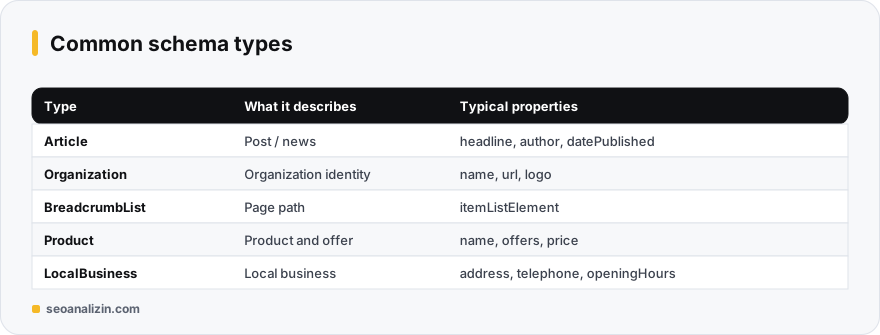
Commonly used types
- Organization / WebSite: organization and site identity.
- Article / BlogPosting: post, author and date information.
- BreadcrumbList: the breadcrumb path.
- Product + Offer: product, price and availability.
- LocalBusiness: address, phone and opening hours.
Example: Article
<script type="application/ld+json">
{
  "@context": "https://schema.org",
  "@type": "Article",
  "headline": "What Is Schema Markup?",
  "author": { "@type": "Person", "name": "Jane Smith" },
  "datePublished": "2026-11-13",
  "dateModified": "2026-11-13",
  "image": "https://example.com/img/schema.jpg"
}
</script>Schema rules
- The information you mark up must be visible on the page. Marking up invisible content breaks the guidelines.
- Fill in required and recommended properties according to Google's documentation.
- A type is not guaranteed to show as a rich result; Google has limited or removed some types (for example HowTo and FAQ). Check the current list in Google's structured data gallery.
Testing and validation
- Produce draft JSON-LD with the Schema Generator.
- Read the existing markup on your page with the Schema Checker.
- Do the final validation with Google's Rich Results Test and the Schema Markup Validator.
- After launch, monitor errors in the Enhancements section of Search Console.
For the special type used in Q&A sections, see the FAQ schema guide.
Which type to start with?
There are three starter markups that suit every site: Organization for organization identity, Article for posts and BreadcrumbList for the navigation path. After adding these, continue according to the type of site: Product for a store, LocalBusiness for a local business.
After adding a type, the relevant report in Search Console and the validation tools show the result within a few days. If there are errors, clear them first, then add a new type.
Schema questions
Does schema raise rankings?
Not directly. It describes the page better and creates a chance for rich results on eligible types.
Should I mark up everything?
No. Add types that match what the page really offers; a little correct markup beats a lot of faulty markup.
Are plugins enough?
Most SEO plugins add the basic types automatically. Still validate the output and check that it matches the page.



Join the discussion
Share your experience or ask a question about this guide.