



Tracking your rankings is the most direct way to see whether your work is paying off. But a single “it shows 5th in my search” observation is not reliable: Google personalises results by location, device and history. Proper tracking means using a consistent method regularly.
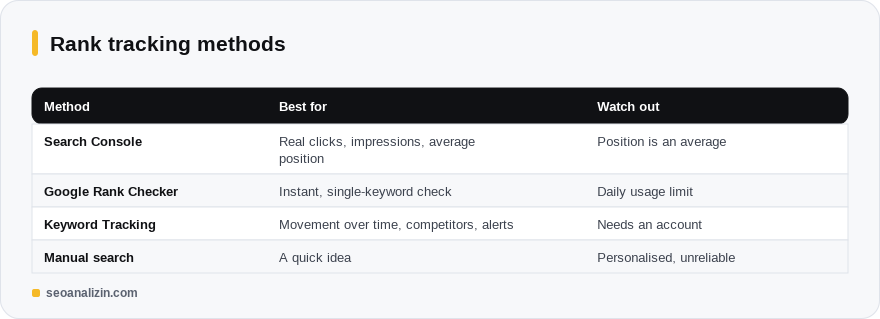
Method 1: Search Console (the most reliable source)
The Search Console Performance report is based on Google's own data: clicks, impressions, CTR and average position for each query. One important detail: average position is the average across all impressions of the query; it is not a single exact rank. It is normal for it to look low on a new site. To get started, see the Search Console guide.
Method 2: Google Rank Checker (instant check)
The Google Rank Checker shows a chosen domain's position in organic results for a keyword, country and language. It suits a quick check after a change or a comparison with a competitor. Usage has a daily limit.
Method 3: Keyword tracking (monitoring over time)
If instead of one-off checks you want to group your keywords in a project and see movement over time, use Keyword Tracking: it works with an account, can group keywords, add competitors and set up automatic checks and alerts.
Traps of checking by hand
- Personalisation: your own search is influenced by your history. A private window does not fully remove location.
- Location and device: the rank may differ on mobile and desktop.
- Day-to-day fluctuation: ranks move from day to day; do not look at a single day.
- Special result boxes: “People also ask” and AI summaries push the links down.
What to track
- Choose 10–30 priority keywords: a mix of main, supporting and long-tail. See long-tail.
- Note the target page for each; when the rank changes, which page ranks may change too.
- Look weekly or fortnightly; daily tracking produces noise.
- Alongside rank, look at the click and impression curve too.
Interpreting results
When rank falls, first check whether the competitor changed, whether the page is still in the index and whether the search intent changed: index check and search intent. The competitor analysis guide helps with comparison.
A simple tracking table
A table is enough to start. On each row write the keyword, target page, date and rank:
keyword | target page | 01.11 | 15.11 | 29.11
what is a sitemap | /blog/sitemap/ | 18 | 14 | 11
canonical tag | /blog/canonical/ | 27 | 22 | 19
Update every two weeks and look at the trend. Keywords ranking 11–20 are the quickest win opportunity: strengthening these pages is often enough to move them to the first page.
Rank tracking questions
Why is the position in Search Console fractional?
Because it is an average; different ranks appear on different devices, locations and times.
Why does my rank change on every check?
Personalisation, location, device and normal result fluctuation.
How many keywords should I track?
10–30 priority keywords are enough to start.



Join the discussion
Share your experience or ask a question about this guide.