



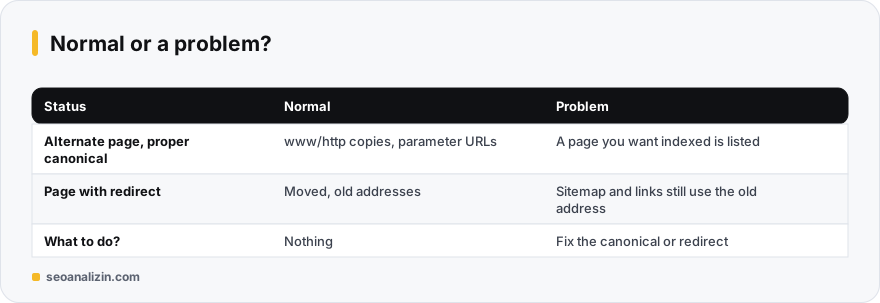
These two statuses appear in Search Console's not indexed list, but most of the time they are not errors. Google is saying the page points to, or redirects to, another address, so it does not index this one. The real question is whether that is what you intended.
“Alternate page with proper canonical tag”
The page's rel="canonical" points to another address and Google accepts that choice. This is a normal outcome and is expected when:
- www and non-www, or http and https versions show the same content.
- Addresses carry
?utm_source=or a sorting parameter. - You use separate print, AMP or mobile addresses.
When is it a problem? When a page you want indexed is on this list. Typical causes: an SEO plugin set to canonicalize every post to the homepage, paginated pages all pointing to page one, or a hard-coded canonical left in a template. Check the canonical in the page source and verify with the Canonical Checker. For details see the canonical tag guide.
“Page with redirect”
The address redirects to another one, so it is not indexed. If you moved old addresses, this is correct and expected. Cases where the redirect is a problem:
- Your sitemap still lists the old, redirected addresses.
- Links inside your site still point to the old address, adding an extra hop on every click.
- A 302 was used for a permanent move. See 301 vs 302.
- There is a redirect chain. See redirect chains.
A quick decision rule
Look at the listed URLs one by one and ask: should this address have been indexed? If the answer is no, you need to do nothing. If yes, fix the canonical or the redirect, point the sitemap and internal links to the final address, then use Request indexing in URL Inspection.
To run the same checks sitewide, the Site Crawler can export canonical targets and redirect status in bulk.
When no fix is needed
The statuses “Alternate page with proper canonical tag” and “Page with redirect” are often not an error but a sign the system works correctly: a parameter address's canonical points to the main address, or an old address goes to the new one with a 301. The cases that need action are these:
- If a page you want in the index appears in this list.
- If a canonical accidentally points to another page.
- If the sitemap contains redirected or alternate addresses: put only the main addresses in the sitemap.
This message is usually an outcome, not an error
Seeing “Alternate page with proper canonical tag” in Search Console means Google deliberately did not index this URL: the page points to another address with a canonical tag and Google prefers that address. It is a sign you handled duplicate content correctly, and there may be nothing to fix. The real question is: is the URL the canonical points to the one you actually want in the index?
The four most common sources
- Parameter URLs: filter and sort URLs such as
/products/?colour=bluegive a canonical to the clean address. - http/https and www/non-www versions: even without a redirect, the canonical points to the main version.
- Mobile or AMP versions: versions on separate URLs point to the desktop page.
- Pagination and tag archives: archive URLs generated by the CMS can canonicalise to the main content.
What a correct canonical looks like
<head>
  <!-- On the duplicate URL, pointing to the original page -->
  <link rel="canonical" href="https://example.com/products/blue-shoe/">
</head>- The URL must be absolute: it should start with
https://. - Each page should have one canonical, placed inside
<head>. - The original page should also point to itself (self-referencing); this guards against versions with added parameters.
- For non-HTML files such as PDFs, a canonical can be given in an HTTP header.
Where the real problem starts
A canonical is a hint, not a command; Google may choose a different canonical URL. Problems start when:
- Wrong target: every product page canonicalises to the home page. The products will not be indexed.
- Conflicting signals: the canonical points to one URL while the sitemap and internal links point to another. Google gets confused and makes its own choice.
- Used together with noindex: mixing canonical and noindex on one page gives unclear results; pick one.
- Blocked target: the URL the canonical points to is blocked by robots.txt or returns 404.
Checking: how to read a canonical
- Open the page, view source and look for the
rel="canonical"line. - Use Canonical Checker to see where a URL's canonical points.
- In Search Console URL Inspection, compare “User-declared canonical” with “Google-selected canonical”; if they differ, Google does not agree with your choice.
When to worry and when to move on
- If the listed URLs are parameter, filter or duplicate versions and the canonical points to the right address: move on.
- If an important page (product, category, article) is on this list and its canonical points to another page: fix it.
- If Google's chosen canonical differs from yours: merge the signals (internal links, sitemap, redirects) onto one URL and read the duplicate content guide.
Things you might ask
Will my rankings drop as these counts grow?
No. These are duplicates and old addresses that should not be indexed anyway. What matters is that pages you want indexed are not on the list.
What if Google picks a different canonical?
That is a separate status: “Duplicate, Google chose different canonical than user.” It appears when two pages are very similar or signals conflict.
Should I delete redirected pages?
No. Redirect rules keep serving old links and links from other sites.



Join the discussion
Share your experience or ask a question about this guide.