



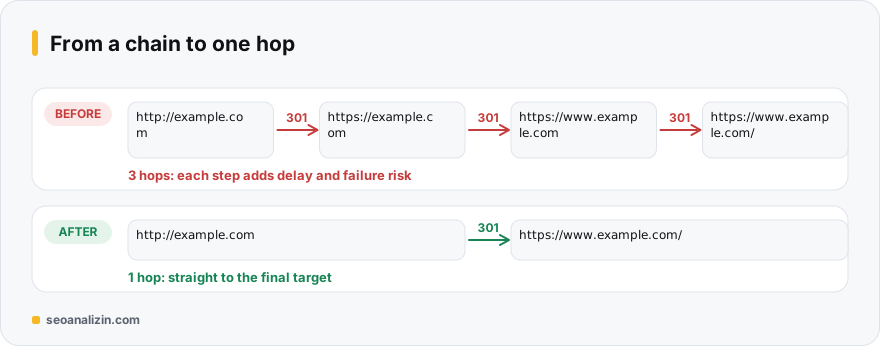
A redirect chain is when an address passes through more than one redirect before reaching its final destination: the http address goes to https, then to www, then to the trailing-slash version. Each hop is an extra request and delay. A loop is when redirects point back to each other, and the browser shows ERR_TOO_MANY_REDIRECTS.
Why do chains form?
- HTTPS, www and trailing-slash rules were written separately and run one after the other.
- The site was moved several times and new redirects were stacked on old ones.
- An SEO plugin, a CDN and a server rule perform the same redirect in different ways.
How to see the chain
Enter the address in the Redirect Checker and see the number of hops. You can also check from the command line:
curl -sIL http://example.com/ | grep -iE '^(HTTP|location)'
# HTTP/1.1 301 ...  location: https://example.com/
# HTTP/2 301 ...    location: https://www.example.com/
# HTTP/2 200
Each 301 line is a hop. For the whole site, list the redirect chains in the Site Crawler report.
Reducing a chain to one hop
The rule is simple: every old address should redirect directly to the final destination. First decide your preferred final address (for example https://www.example.com), then send all variants there with a single rule.
# Apache (.htaccess): send http and non-www addresses to the preferred one in one hop
RewriteEngine On
RewriteCond %{HTTPS} off [OR]
RewriteCond %{HTTP_HOST} !^www[.] [NC]
RewriteRule ^ https://www.example.com%{REQUEST_URI} [L,R=301]
The same applies to page moves: if A→B and B→C exist, redirect A directly to C. Update internal links and the sitemap to the final address so visitors never enter a redirect at all.
If there is a loop
- WordPress: the site address in Settings may not match the one in wp-config, or two SSL plugins may be running together.
- CDN: settings like “flexible SSL” can create a loop where the server forces http and the CDN forces https. Use full SSL mode.
- Clear cookies and disable plugins one by one: that is how you find which one reverses the rule.
Google follows at most 10 hops in a redirect chain, but that is a limit, not a target: in practice there should be one hop. For the difference between 301 and 302, see this guide.
When should you fix a chain?
A two-hop redirect (http → https → www) works fine, but each hop is an extra request. The rule is simple: every old address should go straight to the final address. Three or more hops, a loop or a 404 after a redirect need an urgent fix.
Repeat this check after a site move or an https migration; most chains arise from new rules stacked on top of old ones.
301, 302, 307, 308: which and when?
- 301 (moved permanently): the address changed for good. Use it for site moves, the switch to https and URL structure changes.
- 308 (permanent, method preserved): works like a 301; the result for search engines is the same.
- 302 / 307 (temporary): the address is elsewhere for a short time. If used for a permanent move, Google may keep the original URL in the index.
- Meta refresh and JavaScript redirects: avoid them where you can; a server redirect is more reliable and faster.
Google does not say that 3xx redirects lose ranking signals; still, every extra step means slowness and a chance of error. Make a redirect one step and permanent wherever you can.
Two common redirects: code examples
# Apache (.htaccess): permanent redirect to https
RewriteEngine On
RewriteCond %{HTTPS} off
RewriteRule ^ https://%{HTTP_HOST}%{REQUEST_URI} [L,R=301]

# Apache: move a single old URL to the new one
Redirect 301 /old-post/ https://example.com/new-post/

# Nginx: permanent redirect to https
server {
    listen 80;
    server_name example.com www.example.com;
    return 301 https://example.com$request_uri;
}
Note in this example that the www and non-www versions also merge straight into one address: http://www.example.com should go through one redirect, not two separate ones (first https, then non-www).
How long should a redirect stay?
Google recommends keeping a redirect in place for at least a year, because it takes time for links and visits to the old URL to reach the new one. For URLs that still receive external links, redirecting indefinitely is safest.
A checklist for migration day
- Is the old-to-new mapping table ready? Were pages with a topical match paired with each other?
- Are the redirects one-step? Try sample URLs in Redirect Checker.
- Do internal links, the sitemap and canonical tags point to the new addresses?
- Make sure robots.txt and
noindextags were not carried over to the new site by mistake. - Is the new property verified in Search Console and the sitemap submitted?
- For the first two weeks after the move, watch the Pages report for 404 and redirect errors.
A redirect chain and its fix
Chain:  http://www.example.com/blog  ->  https://www.example.com/blog
        ->  https://example.com/blog  ->  https://example.com/blog/

Fix:    http://www.example.com/blog  ->  https://example.com/blog/   (one step)
Every link in the chain is an extra request; Google follows a chain only up to a certain length, and for a mobile user each step adds delay. The fix is for every old URL to go straight to the final address. For broken URLs and bad redirects, see the 404 guide too.
Redirect questions
Do 301s in a chain pass value?
Generally yes, but every hop adds delay and risk of failure. Reducing to one hop is always safer.
Does a trailing-slash rule count toward a chain?
Yes. If the slash and no-slash versions run as separate redirects, they join the chain. Combine them in one rule.
How do I notice a redirect loop?
The browser shows a “too many redirects” error and the page does not load. The Redirect Checker also detects loops.



Join the discussion
Share your experience or ask a question about this guide.