



A 404 is the server saying “there is nothing at this address.” For a deleted page, that is the right answer and it does not hurt you with Google. The problem is when a page that should exist returns 404, or when your own site links to a 404.
When does a 404 hurt SEO?
- When a page that earned traffic and external links is deleted by mistake, its value is lost.
- When menus, posts or the sitemap still link to 404s, both visitors and crawlers are sent nowhere.
- When the same issue repeats across many pages, crawling efficiency drops.
Do not fear a 404 for individual old pages: Google drops those addresses from the index over time.
Pick the right decision
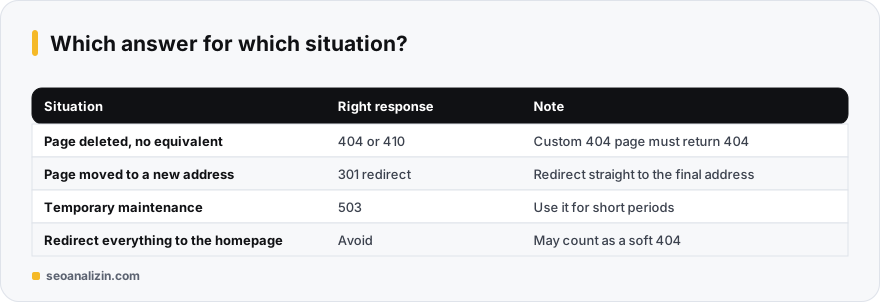
- Page permanently deleted, no equivalent: leave a 404 or 410.
- Page moved or replaced: 301 to the relevant new page.
- Page deleted by mistake: restore it.
- An external link points to a misspelled address: 301 it to the correct one.
Redirecting every deleted page to the homepage is wrong: users land somewhere unexpected and Google often reads it as a soft 404. See soft 404.
Build a custom 404 page
A 404 page should guide the user: a search box, popular posts and a link to the homepage. But the most important rule is that the page must be returned with a 404 status code.
# Apache (.htaccess)
ErrorDocument 404 /404.php

// PHP: at the top of the 404 page
http_response_code(404);
To verify, open a bad address in the browser and run curl -I https://example.com/no-such-page in a terminal; the first line should show 404.
Where to find 404s
In Search Console, the “Not found (404)” row in the Pages report lists the 404s Google has seen. For broken links inside your own site, run a scan with the Site Crawler. For details see the broken links guide. The HTTP Header Checker shows what status code an address actually returns.
404, 410 or a redirect?
The right response for a deleted page depends on the situation:
- It moved or has a close equivalent: a 301 to the new address.
- Permanently removed with no equivalent: a 404 or 410 is enough. 410 means “gone for good.”
- Temporarily unavailable: not a 404 but an appropriate 5xx or maintenance response.
Redirecting every 404 to the home page is not a good fix; Google may see it as a soft 404. See the soft 404 guide.
Is your page really returning 404? Verify the status code
Seeing a “page not found” message in the browser does not mean the server answered with a 404. Many themes and plugins serve the error page with a 200 status, which Google treats as a “soft 404.” Check the response header:
curl -I https://example.com/nonexistent-page-12345
# Expected first line:  HTTP/2 404
# If you see 200, your custom 404 page is served with the wrong code.
The right setup for a missing URL is for the server to show the custom page and keep the 404 status:
# Apache (.htaccess)
ErrorDocument 404 /404.html

# Nginx
error_page 404 /404.html;
location = /404.html { internal; }
In WordPress the theme does this job and you need not edit code, but still try a nonexistent URL and confirm the header.
Make the redirect decision with three questions
- Is there a closely related page that replaces this URL? If so, redirect to it with a 301.
- Was the URL removed on purpose and permanently, with nothing to replace it? Leave a 404 or 410; do not force a redirect.
- Does the URL receive external links or still draw traffic? Then a redirect is worth a lot; give a 301 to the nearest topic.
Redirecting every 404 to the home page is a common mistake. Google often reads an unrelated redirect as a soft 404, and the visitor does not find what they wanted. A redirect adds value only when the content truly corresponds.
Scenario: 300 errors after a site migration
A site moved to a new platform and its URL structure went from /product/blue-shoe to /products/blue-shoe/. A few days later Search Console showed hundreds of “Not found (404)” entries. In order, you should:
- Get the list of old URLs from your sitemap or an old crawl export.
- If the URL pattern is consistent, write one rule for bulk redirects; do not write each URL by hand.
- Test the redirects: use Redirect Checker to confirm sample URLs reach the new page in one hop.
- Update internal links to the new address; leave no internal link that depends on a redirect.
- Refresh the sitemap with the new URLs.
Priority: which 404s to fix first
- Those with internal links: a broken URL clicked from inside your own site loses the visitor straight away. Fix these first (see the broken links guide).
- Those with external links: a redirect can carry the value of links from other sites to a live page. Use Backlink Checker to see which old URLs receive links.
- Those with traffic: URLs that used to get visits should be redirected to the closest topic.
- Those with nothing: old test URLs, paths that spam bots probe. Leave them alone; staying 404 is normal.
Out-of-stock and discontinued product pages
Keep the page of a temporarily out-of-stock product open and show the “out of stock” notice with similar products. If the product is no longer sold at all, give a 301 to the closest product or category; if there is no close match, leave a 404/410. Deleting the page and sending it home raises both soft-404 risk and visitor frustration.
A monthly 404 cleanup routine
- Open the “Not found (404)” list in Search Console > Pages.
- Sort the URLs by the four priorities above.
- Apply a redirect or fix to the first two groups (internal and external links).
- Note what you fixed and check next month that the list has shrunk.
Common 404 questions
Will many 404 pages lower my rankings?
A 404 for deleted pages is normal and does not by itself lower rankings. Losing important pages or linking to 404s from within your site is the issue.
Should I use 404 or 410?
Both mean “page gone.” A 410 states the removal is permanent. In practice Google treats them similarly, and 404 is enough for most sites.
How long until Google drops a 404 page from the index?
From a few days to a few weeks. The Removals tool can force it, but it is usually unnecessary.



Join the discussion
Share your experience or ask a question about this guide.