



HTTPS has been a lightweight ranking signal for Google since 2014. It will not lift your rankings by itself, but staying on HTTP or running half-HTTPS (mixed content) leads to browser warnings, lost conversions and a trust problem. So the answer to “does it matter?” depends less on direct ranking and more on whether users stay on your site.
What is mixed content?
When a page loads over HTTPS but an image, script or stylesheet inside it is fetched from an HTTP address, that is mixed content. Browsers block active content such as scripts and styles; for passive content such as images they show a warning and sometimes remove the padlock. The result is broken-looking pages and an insecure label.
Finding mixed content
- Open the page in the browser and look for “Mixed Content” warnings in Developer Tools > Console.
- Check the HTTPS usage and HSTS checks in the SEO Analysis report.
- List internal resources and links starting with
http://with the Site Crawler.
The fix
- Change
http://addresses in templates, themes and content tohttps://. In WordPress, a bulk search-and-replace plugin on the database makes this easier. - If a third-party script or image does not support https, change the source or host the file yourself.
- As a temporary safety net you can use the
upgrade-insecure-requestsdirective, but the real fix is changing the addresses.
# Apache: directive that upgrades http requests from the browser to https
Header always set Content-Security-Policy "upgrade-insecure-requests"Migrating from HTTP to HTTPS
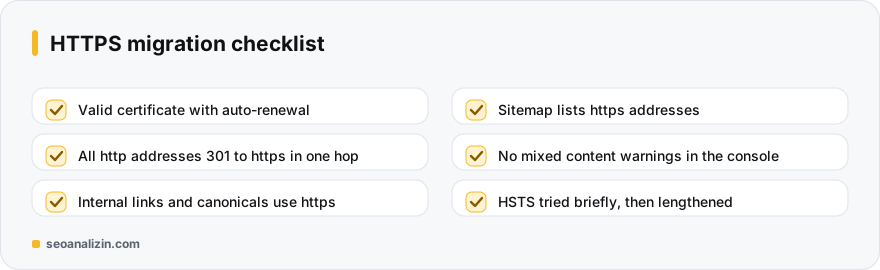
- Install a valid certificate. Free ones such as Let's Encrypt are common; make sure auto-renewal is on.
- 301 all http addresses to their https equivalents and keep chains short. See redirect chains.
- Switch internal links, canonical tags and the sitemap to https addresses.
- Use the https version (or the Domain property) in Search Console.
HSTS and certificate monitoring
The HSTS header tells the browser to open the site only over https. Try it with a short duration first, and lengthen it once you see no problems.
Strict-Transport-Security: max-age=31536000; includeSubDomainsincludeSubDomains affects every subdomain, and preload is a decision that is hard to reverse; use both carefully. Monitor the certificate's expiry date with the SSL Checker: an expired certificate hides your site behind a browser warning.
Example: a post-migration check on a store site
example.com moved to HTTPS; the home page opens with a padlock but the padlock disappears on product pages. The console shows a “Mixed Content” warning: product images are pulled from an old CDN over http://. The fix is a single search-and-replace: change http://cdn.example.com to https://cdn.example.com in the database and confirm the CDN supports https.
After the migration, measure three things again: that http goes to https in one hop, that the sitemap lists https addresses and the certificate's expiry date.
HTTPS questions
How much does HTTPS affect rankings?
It is a small signal. It will not put you ahead of competitors who also use HTTPS, but not using it can leave you behind. The real difference is trust and security.
Is a free certificate enough?
For most sites, yes. The encryption is the same; the difference is the level of validation.
Does mixed content affect rankings?
Not directly, but browser warnings and broken pages cost you users.



Join the discussion
Share your experience or ask a question about this guide.